
Land Measurement on Map
نقشے پر زمین کی پیمائش
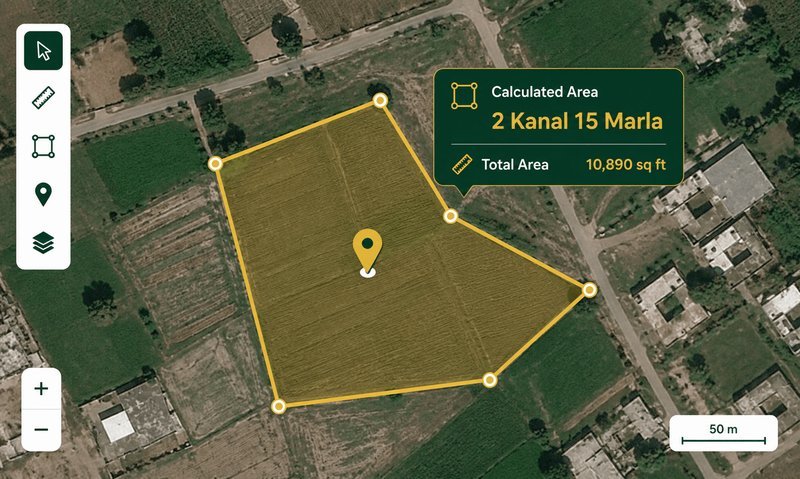
Click points on the satellite map to draw a boundary and instantly get the area in Kanal, Marla, Square Feet, Acres, and Square Meters. Switch between satellite and street view.
How to Measure Land on a Map — Pakistan Guide
The Land Measurement on Map tool lets you measure any piece of land directly on a satellite map. Simply click points around the boundary of a plot, field, or property, and the tool calculates the enclosed area using the Shoelace formula on latitude/longitude coordinates. The result is instantly converted into Pakistan's standard land units: Kanal, Marla, Square Feet, Acres, and Square Meters.
Why Use Map-Based Land Measurement?
Traditional land measurement requires physical access to the property, measuring tapes, and often a Patwari or surveyor. With satellite imagery, you can get a reasonably accurate area estimate from anywhere — no need to visit the site. This is especially useful for:
- Verifying plot sizes before purchase — cross-check the area claimed by the seller against the actual boundary visible on satellite imagery.
- Agricultural land measurement — measure fields, estimate crop area, and plan irrigation without walking the entire boundary.
- Property disputes — get a quick area estimate to compare against revenue records (Fard/Jamabandi).
- Real estate agents and developers — measure multiple plots quickly for listings and project planning.
How the Shoelace Formula Works
The Shoelace formula (also called Gauss's area formula) calculates the area of a polygon given its vertices. For latitude/longitude coordinates, we first convert to Cartesian coordinates using the Earth's radius, then apply the formula. The result is in square meters, which we then convert to all Pakistan land units using standard conversion factors. The accuracy depends on the zoom level and how precisely you place the boundary points — at zoom level 18-20, accuracy is typically within 1-3%.
Satellite vs Street Map
The tool uses Esri World Imagery (high-resolution satellite tiles) by default, which provides clear, up-to-date satellite views of most areas in Pakistan. You can also switch to OpenStreetMap street view, which shows roads, building outlines, and place names — useful for identifying known landmarks and property boundaries.
Marla Standard Selector
Pakistan uses three different marla standards depending on the city and housing scheme. The tool lets you choose between:
- 272.25 sqft — Revenue/Patwari standard, used in Punjab revenue records, LDA schemes, and rural areas nationwide.
- 250 sqft — Used in some older satellite town schemes and parts of KPK.
- 225 sqft — Used by DHA (all cities), Bahria Town, CDA Islamabad, and modern private housing societies.
Always confirm the marla standard from your property documents before relying on the conversion.
Example — Measuring a Farm in Punjab: A farmer in Sheikhupura wants to verify the area of his 25 Killa (25 Acre) field before the wheat harvest. He opens the map tool, zooms in to his village, and clicks around the field boundary. The tool shows 24.7 Acres — close to the 25 Acres recorded in his Fard. The 0.3 Acre difference is within the expected margin of error for map-based measurement.
Zameen Ki Pemaish Ka Formula — زمین کی پیمائش کا فارمولا
Zameen ki pemaish ka formula (زمین کی پیمائش کا فارمولا) depends on the shape of the land. For rectangular plots, the formula is:
- Area = Lambai (لمبائی) × Chaurai (چوڑائی) — Length × Width in feet
- Convert to Marla: Total sq ft ÷ 272.25 (revenue standard) or ÷ 225 (DHA standard)
- Convert to Kanal: Marla ÷ 20
- Convert to Killa/Acre: Kanal ÷ 8
For irregular shapes, divide the land into triangles and use: Area = (Base × Height) ÷ 2 for each triangle, then add them up. Our map tool uses the Shoelace formula which handles any shape automatically.
How to Calculate Marla from Feet
To calculate marla from feet, follow these steps:
- Measure the lambai (length) and chaurai (width) of your plot in feet.
- Calculate the area: Length × Width = Total Square Feet.
- Divide by the marla standard for your area: 272.25 for revenue records, 225 for DHA/Bahria, 250 for some areas.
- The result is the area in marla.
Example: A plot measuring 50 ft × 40 ft = 2,000 sq ft. At the 272.25 standard, 2,000 ÷ 272.25 = 7.35 marla. At the 225 standard, 2,000 ÷ 225 = 8.89 marla. Use our map tool above for instant measurement without manual calculation.
How to Calculate Marla — Quick Methods
How to calculate marla quickly:
- From square feet: Divide sq ft by 272.25 (revenue) or 225 (DHA).
- From kanal: Multiply kanal by 20 to get marla.
- From acre: Multiply acres by 160 to get marla.
- From square yards (gaz): Divide sq yd by 30.25 (revenue) or 25 (DHA).
How to calculate area of plot of land: For any shape, the most accurate method is to use our map-based tool above. Click points around the boundary and the area is calculated automatically using the Shoelace formula. This is much more accurate than manual measurement for irregular plots.
How to Calculate Land Area in Square Feet
To calculate land area in square feet:
- Rectangle/Square: Length (ft) × Width (ft) = Area in sq ft
- Triangle: (Base × Height) ÷ 2 = Area in sq ft
- Circle: π × r² (where r = radius in feet)
- Irregular shape: Use our map tool — it handles any shape automatically
Once you have the area in square feet, convert to Pakistan units: divide by 272.25 for marla (revenue), by 5,445 for kanal, or by 43,560 for acres.
Land Measurement in Pakistan — Traditional vs Modern
Land measurement in Pakistan has evolved from traditional Patwari methods using measuring chains (Jareb) to modern satellite-based tools. The traditional method uses a Jareb (measuring chain) of 66 ft length, with 1 Jareb = 4 Kanal = 0.5 Acre. Today, satellite imagery provides a faster and often more accurate alternative. Our map tool combines both approaches — you get the convenience of satellite measurement with results in traditional Pakistan units.
- Zoom in as close as possible before placing points — higher zoom = better accuracy.
- Place points at clear corners or landmarks (building corners, road intersections, field boundaries).
- Use satellite view for rural/agricultural land and street view for urban plots.
- For irregular shapes, add more points to follow the boundary closely.
- Cross-check with your Fard or Jamabandi for official area verification.
Limitations
Map-based measurement is an estimate, not a substitute for a professional survey. Satellite imagery may be slightly offset, tree cover can obscure boundaries, and the accuracy depends on your point placement. Always verify with a Patwari or licensed surveyor for legal or financial decisions.
See also: Killa Grid & Aks-Shajra Tool for overlaying revenue maps on satellite imagery, and Land Area Converter for converting between all Pakistan land units.
Frequently Asked Questions about Map Land Measurement
How accurate is map-based land measurement?+
At zoom level 18-20, accuracy is typically within 1-3% of the actual area. Factors like satellite image offset, tree cover, and point placement precision affect accuracy. For legal purposes, always verify with a professional survey.
Can I measure land in any country?+
Yes — the satellite map covers the entire world. The area is converted to Pakistan land units (Kanal, Marla, etc.), but you can also see the result in Square Meters and Acres, which are universal.
Which marla standard should I select?+
If you are measuring land from revenue records (Fard/Jamabandi), use 272.25. For DHA, Bahria Town, or CDA properties, use 225. For older satellite towns, check your documents — it may be 250.
How do I clear the points and start over?+
Click the 'Clear All' button to remove all points and reset the polygon. You can also use 'Undo Last' to remove the most recent point one at a time.
Can I save or export the measurement?+
Currently the tool shows results on screen. You can take a screenshot or note down the area values. Export functionality may be added in a future update.
What is the Shoelace formula?+
The Shoelace formula is a mathematical algorithm that calculates the area of any polygon given its vertices. It is named because the cross-multiplication pattern resembles lacing a shoe. It is widely used in GIS and mapping applications.
Why does the area change when I switch between satellite and street view?+
The area calculation itself does not change — it is based on the same coordinates. However, the visual boundary may appear different because the two map layers have slightly different alignment. The calculated area remains the same.
Is this tool free to use?+
Yes, completely free. No login required, no usage limits. The tool runs entirely in your browser using Leaflet.js and free map tile services.
Can I use this for Fard verification?+
Yes — this is one of the most common use cases. Measure the boundary on the map and compare the area with what is recorded in your Fard or Jamabandi. If there is a significant discrepancy, consult the Patwari for clarification.
What is the maximum area I can measure?+
There is no maximum limit. You can measure anything from a small 3 Marla residential plot to a large 100+ Acre agricultural field. The tool handles all sizes accurately.